
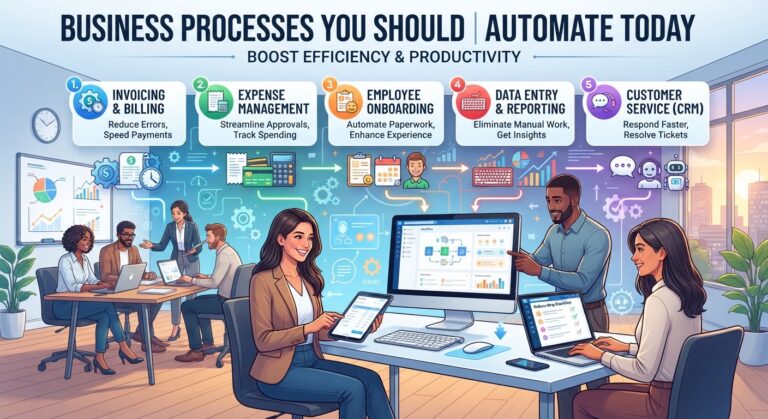
Every business has repetitive work.
Employees answer similar emails, enter information into systems, update spreadsheets, schedule meetings, prepare reports, follow up with leads, process documents, and move information between different applications.
These activities may seem harmless when viewed individually. A five-minute task does not sound like a major problem.
But multiply five minutes by dozens of employees, hundreds of customers, and thousands of transactions, and the amount of lost productivity can become substantial.
This is why business process automation has become increasingly important.
With modern automation and AI-powered tools, businesses can automate many repetitive processes while keeping humans involved where judgment, creativity, communication, and accountability are required.
The goal is not to automate every task.
The goal is to identify the processes that consume valuable time without creating enough value to justify all the manual effort.
In this guide, we will explore the business processes you should automate today, how to identify automation opportunities, and how to build an effective automation strategy.
Business process automation is the use of software, workflows, artificial intelligence, and integrations to perform repetitive business activities with less manual intervention.
A manual process might look like this:
Customer submits information → Employee reads it → Employee enters data → Employee sends email → Employee updates system
An automated workflow could look like:
Customer submits information → System processes data → CRM updates automatically → Appropriate workflow starts → Employee is notified if needed
Automation can involve simple rules or more advanced AI capabilities.
Traditional automation
Trigger → Rule → Action
AI-powered automation
Trigger → AI analyzes information → Decision or classification → Action
Both approaches can be useful.
Automation can provide several benefits.
Save employee time
Employees spend less time on repetitive administrative work.
Reduce manual errors
Automated workflows can reduce mistakes caused by repeated data entry or forgotten steps.
Improve consistency
The same process can be executed according to predefined rules.
Speed up response times
Automated systems can respond immediately when a trigger occurs.
Improve scalability
Businesses can process higher volumes without requiring every additional task to be handled manually.
Improve employee productivity
Employees can spend more time on work requiring human skills.
Create better visibility
Automated workflows can make it easier to track where work is in the process.
Lead management is one of the first business processes companies should consider automating.
Leads may arrive through:
Manually collecting and organizing these leads can waste time.
An automated workflow can:
This helps ensure that new leads do not get lost.
Not every lead deserves the same level of attention.
Sales teams can spend significant amounts of time reviewing leads manually.
AI-powered automation can help classify leads based on information such as:
The system can then prioritize leads for human review.
This allows sales teams to focus more of their time on qualified opportunities.
Many businesses answer the same types of questions repeatedly.
Examples include:
AI-powered workflows can help categorize incoming emails, retrieve relevant information, and prepare responses.
For low-risk routine requests, some businesses may automate responses completely.
For complex or sensitive requests, the system can prepare a draft for human review.
Scheduling meetings manually can create unnecessary back-and-forth communication.
Instead of exchanging multiple messages to find a suitable time, businesses can automate scheduling.
A customer or prospect selects an available time, and the workflow can:
This is a simple automation opportunity with an immediate productivity benefit.
Customer onboarding can involve many repetitive steps.
For example:
New customer
→ Welcome message
→ Account creation
→ Document collection
→ Setup instructions
→ Training resources
→ Internal notification
→ Follow-up reminder
These steps can often be organized into an automated workflow.
Employees can then focus on customers who require personalized assistance.
Growing companies also need to automate internal processes.
When a new employee joins, several departments may need to take action.
HR may need to collect documents.
IT may need to create accounts.
Managers may need to assign training.
Finance may need to process payroll information.
Instead of coordinating everything manually, an onboarding workflow can automatically create tasks and notifications.
This can make the onboarding process more consistent.
Finance teams often process large numbers of invoices.
Manual processing can involve:
AI-powered document processing can assist with extracting information from invoices and routing them to the correct workflow.
For example:
Invoice received → Information extracted → Vendor identified → Approval workflow → Accounting record updated
Human approval can remain part of the process where appropriate.
Employee expenses can also create administrative work.
Automation can help with:
Instead of manually organizing every receipt, employees can submit expenses through a structured workflow.
The system can handle routine processing while exceptions are sent for review.
Data entry is one of the most obvious automation opportunities.
Businesses frequently transfer information between:
If employees repeatedly copy the same information from one system to another, automation may be able to remove unnecessary manual steps.
AI can also help extract information from documents and unstructured text.
Customer service teams receive requests covering many different subjects.
Manually reading and assigning every ticket can take considerable time.
An automated workflow can analyze incoming requests and classify them.
For example:
Customer request → AI classification → Category → Priority → Correct department
The system can then route the request to the appropriate employee or team.
This can reduce delays and improve workflow organization.
Follow-up tasks are easy to forget when they are managed manually.
Businesses can automate reminders and communications after events such as:
A workflow might look like:
Customer interaction → Wait period → Follow-up message → Reminder → Escalation if necessary
Automation makes follow-up more consistent.
Email marketing often involves predictable sequences.
For example:
New subscriber
→ Welcome email
→ Educational content
→ Product information
→ Follow-up
→ Offer
These sequences can be automated based on customer actions and predefined conditions.
AI can also assist with segmentation, personalization, subject-line ideas, and campaign analysis.
Human review remains useful for maintaining brand voice and quality.
Social media management involves repetitive scheduling and publishing tasks.
Businesses can automate portions of the process by:
AI can assist with content ideation and repurposing, while humans can maintain creative direction and brand standards.
Managers often need recurring reports.
These may include:
Instead of manually collecting information every week, businesses can automate data collection and report preparation.
AI can help summarize the information and highlight notable changes for human review.
Meetings generate more work than the meeting itself.
Employees may need to:
AI tools can assist with these tasks.
A meeting workflow could produce a summary and draft action items, allowing employees to review the results rather than starting from a blank document.
Businesses create and receive large amounts of digital documentation.
Automation can help:
This can make information easier to find and reduce manual administrative work.
Contracts and other business documents often require careful human review.
However, AI can assist with preliminary processing.
It may help identify:
The purpose should generally be to assist human review rather than treating AI output as a substitute for qualified professional judgment in high-stakes matters.
Businesses that manage physical products can automate inventory-related notifications.
For example:
Inventory level falls below threshold → System detects condition → Notification sent → Purchase workflow initiated
This can help reduce the risk of employees forgetting to monitor routine inventory levels.
More advanced systems can combine inventory data with historical demand information to support planning.
Employees regularly ask HR, IT, finance, and administration teams for routine assistance.
Examples include:
Automated workflows can collect information, categorize requests, route them, and provide status updates.
This reduces unnecessary back-and-forth communication.
Customer feedback can be automated after relevant interactions.
For example:
Purchase completed → Feedback request → Customer responds → Feedback categorized → Team notified
AI can then help organize large volumes of feedback by theme.
This can make it easier for businesses to identify recurring customer concerns.
Not every process should be automated immediately.
A useful priority framework is:
Process | Automation Potential | Common Benefit |
Data entry | High | Time savings |
Lead capture | High | Faster response |
Appointment scheduling | High | Less coordination |
Email classification | High | Reduced inbox workload |
Report preparation | High | Faster reporting |
Invoice processing | High | Less manual data entry |
Customer FAQs | High | Faster support |
Employee onboarding | Medium-High | Better consistency |
Marketing workflows | Medium-High | Better scalability |
Complex decision-making | Lower | Human judgment remains important |
The exact potential depends on the business.
Ask five questions.
If employees perform the same steps repeatedly, automation may be useful.
A five-minute task performed once a month may not matter.
A five-minute task performed hundreds of times may be an excellent automation candidate.
Processes with clear conditions are often easier to automate.
If you can measure time, errors, cost, or output, you can evaluate the impact of automation.
Automation requires implementation, maintenance, monitoring, and sometimes training.
The expected benefit should justify the investment.
A Simple Automation Opportunity Score
Businesses can evaluate potential automation projects using four factors:
Frequency + Time Consumption + Predictability + Business Impact
For example:
Task | Frequency | Time | Predictability | Impact |
Data entry | High | High | High | High |
Weekly reporting | Medium | High | High | High |
Strategic planning | Low | High | Low | High |
Customer FAQs | High | Medium | High | High |
High-frequency, predictable tasks are often strong starting points.
Traditional automation typically follows predefined instructions.
AI adds capabilities such as:
This makes it possible to automate workflows involving less structured information.
For example, traditional automation might struggle with dozens of differently worded customer emails.
AI can help classify those messages based on meaning rather than exact keywords.
The development of autonomous AI agents is also expanding what businesses can automate.
Traditional automation:
Trigger → Action
AI workflow:
Trigger → AI analysis → Action
AI agent workflow:
Goal → Planning → Tool use → Multiple actions → Evaluation
This could enable more sophisticated workflows in areas such as research, customer service, sales support, operations, and internal knowledge management.
However, increased autonomy also requires stronger controls, permissions, monitoring, and human oversight.
Automating a Broken Process
Automation cannot automatically fix poor processes.
Improve the workflow first.
Automating Too Much
Not every activity should be automated.
Human judgment remains important for many business decisions.
Ignoring Employees
Employees understand the daily workflow and can identify repetitive tasks that management may overlook.
Forgetting Exceptions
Real-world processes rarely follow perfect paths.
Build escalation routes for unusual cases.
Failing to Measure Results
Track performance before and after automation.
Ignoring Security
Automated systems may interact with sensitive information.
Apply appropriate security controls and permissions.
A practical process can be completed in seven steps.
Step 1: List repetitive tasks
Ask employees what they repeat every day or week.
Step 2: Measure the workload
Estimate hours spent on each task.
Step 3: Identify bottlenecks
Find where work gets delayed or errors occur.
Step 4: Choose one process
Start with a manageable workflow.
Step 5: Design the automation
Define triggers, actions, conditions, integrations, and human review points.
Step 6: Test the workflow
Run it in a controlled environment before expanding it.
Step 7: Measure and improve
Track time savings, quality, accuracy, and business outcomes.
Before automating a process, ask:
Business automation is moving from isolated task automation toward connected intelligent workflows.
Instead of automating one individual activity, businesses can connect multiple processes.
For example:
New lead
→ AI analyzes information
→ CRM updates
→ Sales notification
→ Personalized follow-up
→ Meeting scheduling
→ Sales report update
The result is a connected workflow where information moves through the organization with less manual coordination.
As AI agents become more capable, businesses may also be able to automate increasingly complex digital processes within carefully defined boundaries.
The business processes you should automate today are usually the repetitive, predictable, time-consuming activities that do not require constant human judgment.
Lead management, data entry, appointment scheduling, customer support routing, reporting, document processing, employee onboarding, marketing workflows, and follow-ups are just some of the areas where automation can reduce manual work.
The objective is not to remove humans from the business.
It is to remove unnecessary repetitive work from human jobs.
When employees spend less time copying information, organizing routine requests, preparing reports, and performing administrative tasks, they can devote more attention to customers, strategy, creativity, innovation, and growth.
The best automation strategy starts small, measures results, involves employees, protects business data, and expands gradually.
For companies looking to improve productivity in 2026 and beyond, business process automation is no longer simply a technology experiment. It can be a practical way to build faster, more consistent, and more scalable operations.
What business processes should companies automate first?
Companies should generally consider repetitive, high-volume, predictable, and measurable processes first. Examples include data entry, lead capture, appointment scheduling, customer FAQs, report preparation, and document processing.
What is the easiest business process to automate?
Appointment scheduling, simple notifications, repetitive data transfers, basic email workflows, and routine reminders are often relatively straightforward automation opportunities.
Can small businesses automate business processes?
Yes. Small businesses can automate scheduling, customer communication, lead management, invoicing workflows, marketing tasks, and administrative processes.
Can AI automate complex business processes?
AI can assist with more complex workflows involving text, classification, summarization, research, and decision support. However, high-impact decisions may still require human review.
How much time can business automation save?
The amount varies significantly by process, company size, workflow volume, and implementation. Businesses should measure the current time required and compare it with the time required after automation.
Does business automation replace employees?
Automation can reduce repetitive tasks, but employees remain important for creativity, judgment, relationships, strategy, problem-solving, and accountability.
How do I know if a process is ready for automation?
A process is often a strong candidate when it happens frequently, follows predictable steps, consumes significant time, and has measurable outcomes.
What is AI workflow automation?
AI workflow automation combines traditional automated processes with AI capabilities such as classification, natural language understanding, summarization, information extraction, and content generation.
To deliver innovative, scalable, AI, and human-centered technology solutions that empower businesses to thrive in a digital-first economy
1129 Northern Blvd., Suite 404, Manhasset, New York 11030
Privacy Policy | Team of Use | Cache © 2026 All rights reserved