
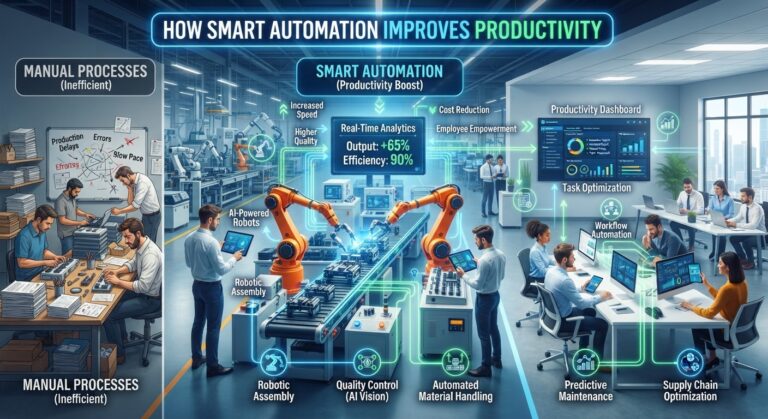
Productivity is not simply about working harder or completing more tasks.
For modern businesses, productivity increasingly means making better use of employee time, technology, information, and business processes.
Employees can lose valuable hours performing repetitive activities such as entering data, organizing documents, answering routine emails, preparing reports, scheduling meetings, updating records, and moving information between different software systems.
This is where smart automation can make a significant difference.
Smart automation combines automated workflows with technologies such as artificial intelligence, machine learning, data processing, and software integrations. Instead of requiring employees to manually perform every step of a process, intelligent systems can handle appropriate repetitive activities while employees focus on work requiring judgment, creativity, communication, and expertise.
The result can be a more efficient workplace where technology handles routine processes and people spend more time creating value.
In this article, we explore how smart automation improves productivity, the business processes it can improve, common implementation mistakes, and practical ways companies can build a more productive automated workplace.
Smart automation refers to the use of software, artificial intelligence, automated workflows, and connected systems to perform business tasks with reduced manual intervention.
Traditional automation often follows predefined instructions.
For example:
When a customer submits a form → send an email.
Smart automation can add intelligence to the workflow:
Customer submits a form → AI analyzes the information → classifies the request → updates the CRM → determines the appropriate workflow → prepares a response.
This makes automation more useful for processes involving unstructured information, changing conditions, or multiple steps.
Traditional Automation | Smart Automation |
Primarily rule-based | Can incorporate AI and data analysis |
Works well with predictable processes | Can handle more complex information |
Requires predefined conditions | Can interpret information |
Performs specific actions | Can coordinate multiple actions |
Limited adaptability | More flexible |
Often task-focused | Can be workflow-focused |
Smart automation does not replace traditional automation.
Instead, it expands what automated systems can accomplish.
Productivity losses often come from small repetitive tasks.
An employee might spend:
Individually, these tasks may not seem significant.
Across a full team and an entire year, however, the cumulative time can become substantial.
Smart automation helps reduce this repetitive workload.
The objective is not simply to make employees work faster.
It is to remove unnecessary work from the workflow altogether.
One of the most direct ways automation improves productivity is by handling repetitive work.
Examples include:
When these tasks are automated, employees can spend more time on activities that require human involvement.
Time is one of the most valuable resources in any organization.
Imagine an employee spends 30 minutes every day performing a repetitive administrative task.
Over approximately 250 working days, that equals:
125 hours per employee per year.
If 20 employees perform the same task:
2,500 hours per year.
This example is illustrative, but it demonstrates why seemingly small automation opportunities can become significant at organizational scale.
Data entry is a common source of repetitive work.
Businesses often move information between:
Smart automation can transfer information between connected systems automatically.
AI can also extract information from documents, emails, and other unstructured sources.
This reduces the amount of manual typing employees need to perform.
Manual workflows often involve waiting.
For example:
Employee completes task → sends email → waits for response → updates system → notifies next employee
Automation can reduce some of these delays.
A workflow can automatically trigger the next action when a condition is met.
For example:
Task completed → system updates record → next task created → employee notified
This can help work move through the organization more quickly.
Repetitive tasks can lead to mistakes.
Employees may accidentally:
Automation can reduce certain types of manual errors by consistently executing predefined processes.
However, automation is not automatically error-free.
Poorly designed workflows can create systematic mistakes.
That is why testing and monitoring remain important.
A manual process may be completed differently by different employees.
Automation can standardize routine steps.
For example, every new lead could automatically receive:
This creates a more consistent process.
Consistency is particularly valuable as companies grow.
Customer service teams frequently handle repetitive requests.
Smart automation can help with:
For example:
Customer message → AI analyzes request → identifies category → retrieves relevant information → prepares response → escalates if necessary
Human representatives can then focus on complicated or sensitive cases.
Salespeople often spend time on administrative activities instead of selling.
Smart automation can assist with:
For example, when a new lead arrives, an automated workflow can create a CRM record and notify the appropriate salesperson.
This allows the sales team to spend less time managing administrative tasks.
Marketing involves many recurring workflows.
Automation can assist with:
AI can also help analyze customer behavior and organize information for marketers.
This can reduce repetitive campaign management tasks.
Business reporting can consume significant employee time.
A typical manual reporting process might involve:
Collect data → clean data → organize information → calculate metrics → create charts → write summary → distribute report
Automation can handle portions of this process.
AI can also assist with generating summaries and identifying notable changes.
Employees can then review the results and focus on interpreting what the data means.
Employee onboarding requires coordination between departments.
For example:
New employee added
→ HR receives notification
→ IT account setup begins
→ Manager receives onboarding tasks
→ Training materials assigned
→ Required documents requested
→ Progress tracked
Automation can coordinate these steps.
This helps reduce administrative work while creating a more consistent onboarding experience.
Businesses process many documents every day.
These may include:
AI-powered document processing can extract important information and route it to the correct workflow.
For example:
Document uploaded → AI extracts information → document classified → record created → appropriate employee notified
This can significantly reduce manual document handling.
Internal communication can become complicated as companies grow.
Employees may need to monitor:
Smart automation can help summarize information and deliver relevant updates to the right people.
For example, an automated workflow might notify a manager when a project reaches a specific milestone.
This reduces the need for employees to manually monitor every update.
Context switching occurs when employees repeatedly move between unrelated tasks or applications.
For example:
Email → Spreadsheet → CRM → Calendar → Document → Email
Every transition can interrupt concentration.
Automation can connect systems and reduce the number of manual steps required between applications.
This allows employees to stay focused on the main task.
The greatest productivity benefit may not be simply saving minutes.
It is redirecting employee time.
Instead of spending hours on repetitive administration, employees can focus on:
This creates a healthier division of responsibilities between people and technology.
Department | Productivity Opportunities |
Sales | Lead management, CRM updates, follow-ups |
Marketing | Campaign workflows, reporting, segmentation |
Customer Service | Ticket routing, FAQs, summaries |
Finance | Invoice processing, data extraction |
HR | Onboarding, employee requests |
Operations | Workflow coordination, notifications |
IT | Ticket classification, documentation |
Management | Reporting, summaries, monitoring |
The best opportunities depend on the company’s workflows.
Before implementing automation, businesses should identify where time is being lost.
Ask employees:
“What tasks do you repeat every day or every week that take time but add little strategic value?”
Other useful questions include:
These questions can reveal valuable automation opportunities.
Businesses can follow this process.
Step 1: Identify
Find repetitive and time-consuming tasks.
Step 2: Document
Write down every step in the current workflow.
Step 3: Simplify
Remove unnecessary steps before automating.
Step 4: Automate
Use software, integrations, or AI to handle appropriate tasks.
Step 5: Review
Keep humans involved where judgment or accountability is required.
Step 6: Measure
Compare performance before and after automation.
Step 7: Improve
Continuously optimize the workflow based on actual results.
Businesses should measure automation rather than simply assuming it works.
Useful metrics include:
Time saved
How many employee hours are being saved?
Processing time
How quickly does the workflow now complete?
Error rate
Are manual errors decreasing?
Cost per task
Has the cost of completing the process changed?
Employee workload
Are employees spending less time on repetitive activities?
Customer response time
Are customers receiving faster responses?
Completion rate
Are workflows being completed more consistently?
Business outcomes
Is the automation contributing to measurable business goals?
Small businesses can benefit from automation even without large technology teams.
Common starting points include:
The best approach is usually to start with one process that is easy to measure.
Once the workflow proves useful, the business can expand automation gradually.
As companies grow, automation becomes increasingly valuable because processes become more complex.
A company with five employees may coordinate many tasks manually.
A company with 50 employees may need:
Smart automation can provide a foundation for scalable operations.
The rise of autonomous AI agents is expanding what smart automation can do.
Traditional automation:
Trigger → Rule → Action
AI-powered automation:
Trigger → AI analysis → Action
AI agent:
Goal → Plan → Analyze → Use tools → Act → Evaluate
This can enable more sophisticated workflows involving research, customer service, reporting, and business operations.
However, agentic systems should operate within clearly defined permissions and business rules.
Not every process benefits from automation.
Human judgment remains essential for many activities.
Automation can make an inefficient process faster without making it better.
Simplify first.
Employees are often the best source of information about repetitive work.
Important decisions may require human review.
Automated workflows can access sensitive business information.
Use appropriate permissions and security controls.
Without measurement, it is difficult to know whether automation is actually improving productivity.
The workplace is gradually moving toward greater collaboration between people and intelligent software.
Employees may increasingly describe desired outcomes while automated systems handle routine coordination.
Instead of manually completing every step, workers may supervise workflows that:
This can shift employees from performing repetitive tasks toward managing and improving intelligent processes.
Before automating a process, ask:
Smart automation improves productivity by reducing repetitive work, connecting business systems, accelerating workflows, minimizing certain manual errors, and giving employees more time for high-value activities.
The goal should not be to replace every human task with technology.
Instead, businesses should identify where automation can remove unnecessary friction from everyday work.
A successful smart automation strategy combines technology with thoughtful process design.
Businesses should start with repetitive and measurable workflows, involve employees, establish appropriate human oversight, protect sensitive information, and continuously measure results.
When implemented carefully, smart automation can turn fragmented manual processes into connected workflows and help organizations use their most valuable resource—employee time—more effectively.
The future of productivity is not simply about doing more work.
It is about spending less time on unnecessary work and more time creating meaningful value.
How does smart automation improve productivity?
Smart automation improves productivity by handling repetitive tasks, reducing manual data entry, accelerating workflows, connecting software systems, and allowing employees to focus on higher-value activities.
What is smart automation?
Smart automation combines automated workflows with technologies such as artificial intelligence, data processing, and software integrations to perform or assist with business processes.
What tasks can businesses automate?
Businesses can automate scheduling, data entry, lead management, customer support routing, reporting, document processing, follow-ups, onboarding, marketing workflows, and many other repetitive activities.
Can small businesses use smart automation?
Yes. Small businesses can begin with simple workflows such as appointment scheduling, lead capture, email follow-ups, invoicing, customer FAQs, and reporting.
Does automation improve employee productivity?
Automation can reduce repetitive administrative work, allowing employees to dedicate more time to strategic, creative, customer-focused, and problem-solving activities.
How can businesses measure automation productivity?
Businesses can measure hours saved, processing time, error rates, workflow completion, employee workload, response time, operating costs, and other relevant business outcomes.
Is smart automation expensive?
Costs vary depending on the tools, integrations, workflow complexity, and scale. Businesses can begin with small workflows and expand as measurable benefits are demonstrated.
What is the difference between AI automation and smart automation?
The terms overlap. Smart automation generally describes automated processes enhanced with intelligent technologies such as AI, while AI automation specifically emphasizes artificial intelligence within the workflow.
To deliver innovative, scalable, AI, and human-centered technology solutions that empower businesses to thrive in a digital-first economy
1129 Northern Blvd., Suite 404, Manhasset, New York 11030
Privacy Policy | Team of Use | Cache © 2026 All rights reserved